Render Calculator
Estimate render area, bags or tubs, wastage and material cost for walls.
- Monocouche coloured render: approx. 1.0 m² per 25kg bag
- Wastage allowance: 10%
- Coat allowance: Single coat / manufacturer coverage
- Wall condition allowance: Normal / flat wall
Use this render calculator to estimate how many bags or tubs of render you need for a wall. Enter the wall length and height, choose a render coverage preset, add wastage and optional cost per bag or tub to get an estimated quantity and material cost.
The calculator supports metric and imperial measurements, standard and advanced modes, openings such as doors or windows, coat allowance and wall condition adjustments.
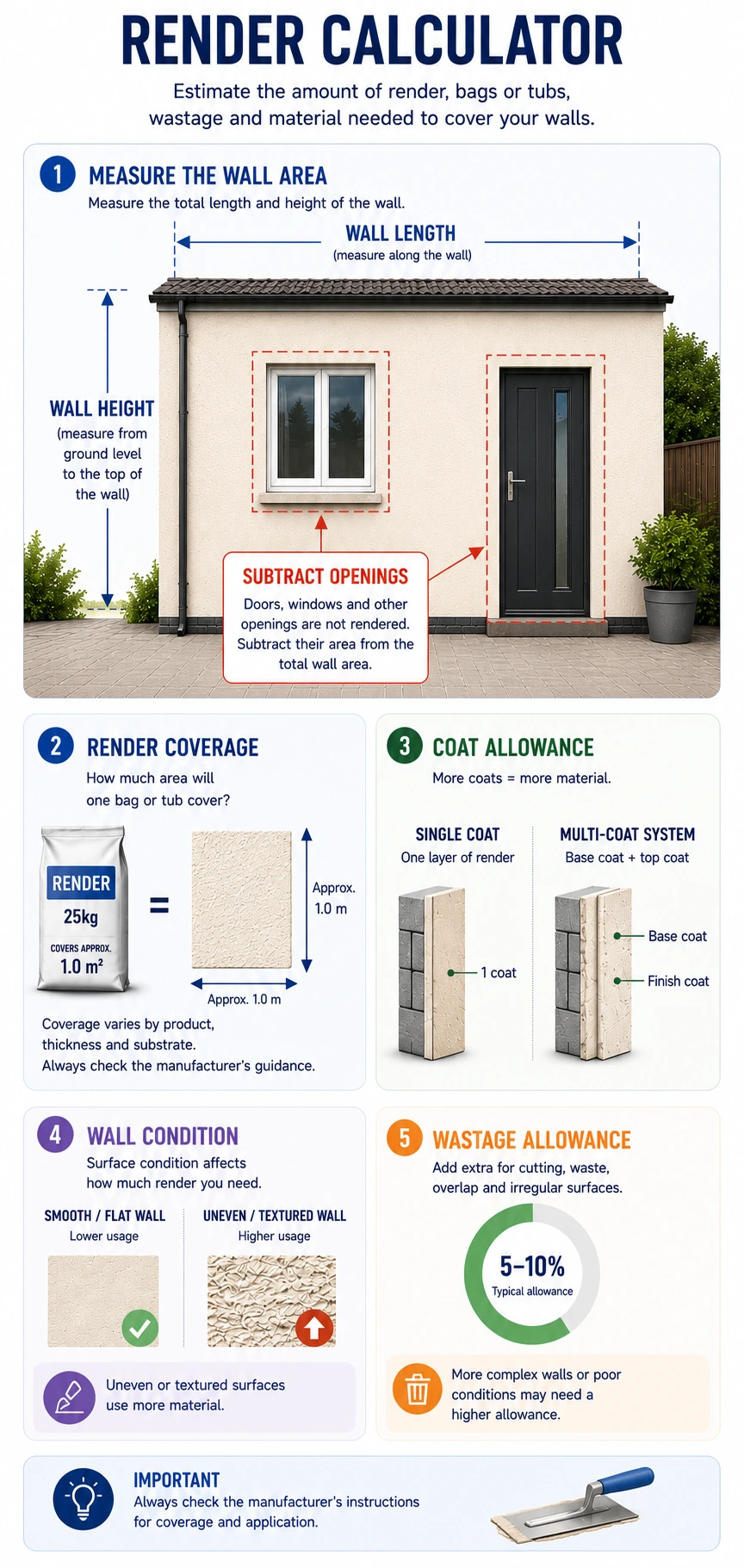
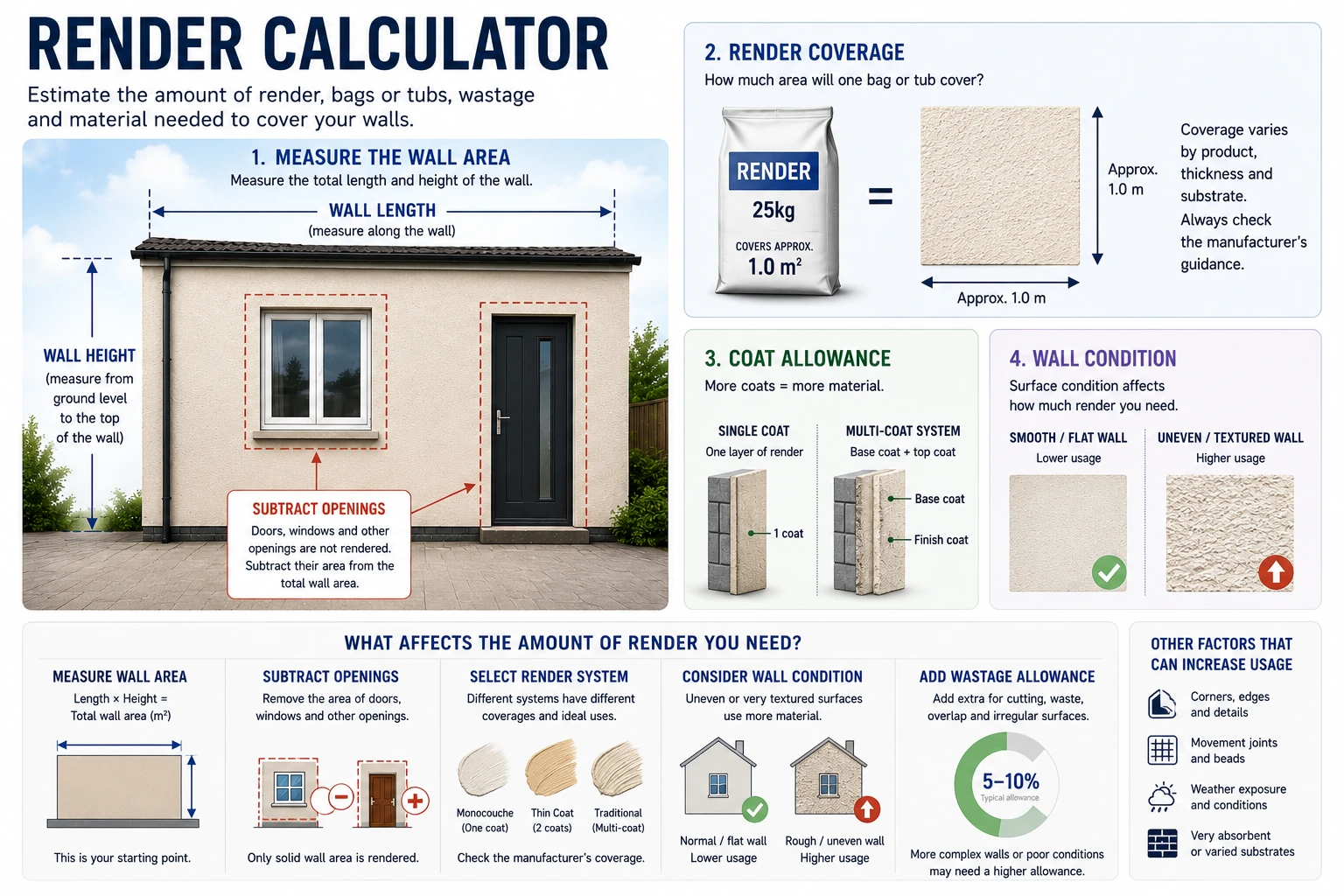
PRO TIP: Always check the render manufacturer’s coverage data before ordering. For example, some monocouche renders are commonly estimated at around 1m² per 25kg bag, but coverage depends on thickness, substrate and finish.
How to Use the Render Calculator
Start by choosing metric or imperial units. In standard mode, enter the wall length and height, then select the render system or coverage preset. The calculator includes presets for monocouche render, basecoat or scratch coat, thin coat finish render, and custom coverage.
Use custom coverage when your render manufacturer gives a specific m² per bag or tub. This is especially useful for sand and cement render, where the calculator does not assume a fixed coverage rate.
Add your wastage percentage. The default is 10%, which is a practical allowance for cuts, uneven coverage, small losses and ordering safety margin. Enter a cost per bag or tub if you want an estimated material cost.
Advanced mode lets you add openings, choose a single or two-coat allowance, and add an extra percentage for uneven walls.
If you’re estimating materials for a complete cavity wall before applying the external finish, use our cavity wall calculator to calculate the bricks, blocks, insulation, wall ties and mortar required.
Results Explanation
The calculator shows the total number of bags or tubs needed, rounded up to a whole pack. It also shows the wall area, packs before wastage, estimated material total where pack size is known, and estimated cost if you entered a price.
In advanced mode, the results also show the opening area, net render area and adjusted area after coat and wall condition allowances.
How the Maths Works
- Wall area
Wall length × wall height = gross wall area. - Openings deduction
In advanced mode, each opening is calculated as width × height. Total openings are deducted from the gross wall area. - Advanced allowances
Net area is multiplied by the coat allowance, then increased by the selected wall condition percentage. - Render packs before wastage
Adjusted area ÷ coverage per bag or tub, rounded up. - Final packs with wastage
Adjusted area × (1 + wastage %) ÷ coverage, rounded up. - Estimated cost
Total bags or tubs × cost per bag or tub.
Imperial measurements are converted into metres internally. Results can be displayed in square feet, but the core calculation uses square metres.
Common Mistakes to Avoid
Do not ignore window and door openings on larger walls, as they can noticeably reduce the required material.
Do not use a generic coverage figure when the product data sheet gives a specific coverage rate.
Do not set wastage to zero unless the area is very simple and you already have spare material.
Do not render in poor conditions. Some UK render systems warn against application in frost risk, wet conditions, direct hot sun, or unsuitable temperatures.
FAQs
How many bags of render do I need per m²?
It depends on the render system and thickness. As a broad guide, this calculator uses 1.0m² per 25kg bag for monocouche and 1.2m² per 25kg bag for basecoat, but manufacturer coverage should be used where available.
How much wastage should I allow for render?
A 5–15% allowance is common for many wall rendering jobs. This calculator defaults to 10% and warns when wastage is set unusually high.
Should I deduct windows and doors from render area?
Yes, especially on larger elevations. Use advanced mode to add openings and deduct them from the wall area.
Can I use this for sand and cement render?
Yes, but you should enter custom coverage. The calculator does not assume a fixed sand and cement coverage because thickness, mix and wall condition can vary. If you also need to calculate mortar for the underlying brickwork or blockwork, use our mortar calculator.
Does uneven brickwork affect render quantity?
Yes. Uneven walls can require more material to level the surface. Advanced mode lets you add 5%, 10% or 15% for wall condition. If you’re calculating materials for a new block wall before rendering, use our block calculator to estimate the blocks required.
What does “packs before wastage” mean?
It is the number of bags or tubs needed before adding your wastage allowance.
What does “adjusted area” mean?
In advanced mode, the adjusted area is the net wall area after openings, coat allowance and wall condition allowance.
Why does the calculator round bags or tubs up?
Render is bought in whole packs, so the calculator rounds up to avoid under-ordering.
Related calculators
Disclaimer
This calculator gives an estimate only. Always check the render product data sheet, substrate suitability, required thickness, weather limits and preparation requirements before ordering or applying render. For structural, damp, insulation or building control concerns, speak to a qualified professional.